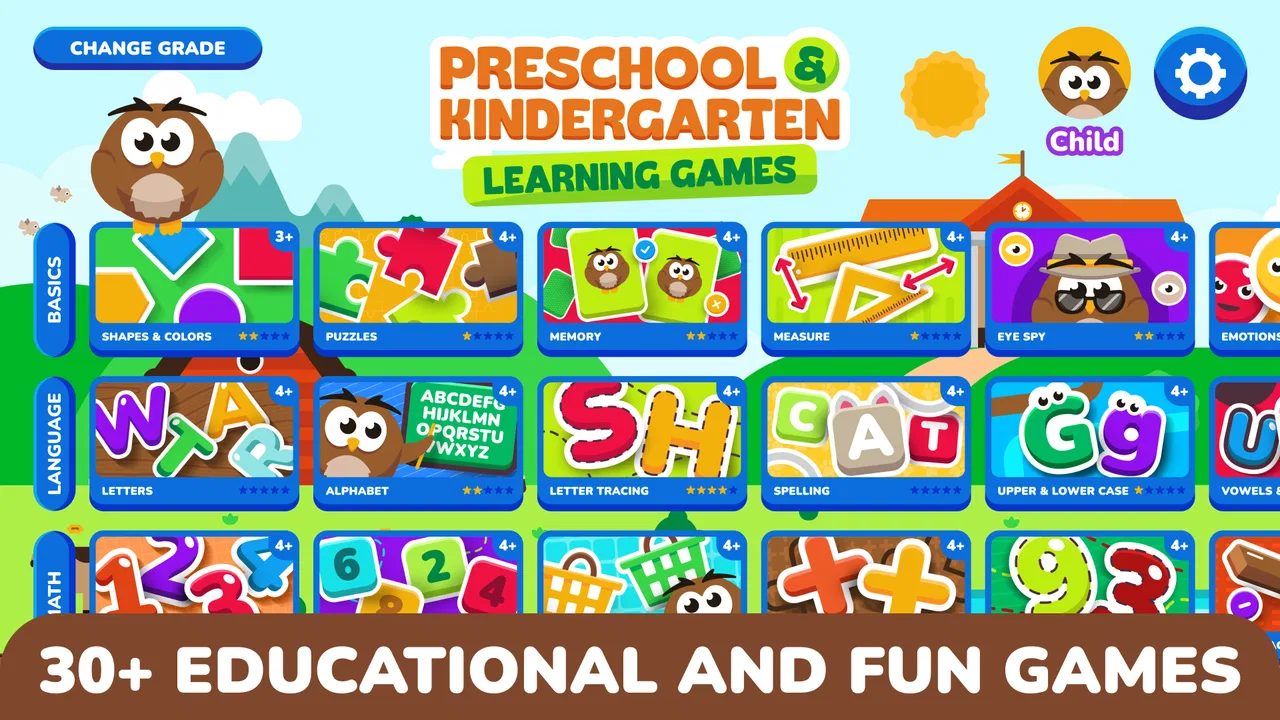
Preschool & Kindergarten Games
- 4.2
- Rating
- 1.00M
- Installs
- Free
- Price

 Analysis by App-foxy
Preschool & Kindergarten Games is the kind of educational game I would put on a tablet when I want a young child to practise early skills without turning the moment into a formal lesson. The first impression is simple: a child taps, drags, matches, counts, identifies letters, and receives an immediate response. That direct connection between an action and a result is the heart of the experience.
In my experience, that matters more at preschool age than a large amount of explanation. A child can understand a short task, try an answer, see what happened, and decide whether to try again. The game is aimed at preschool, pre-kindergarten, and kindergarten learners, with activities connected to the alphabet, numbers, and early maths. It is available as a free game, although individual in-app purchases range from $4.99 to $39.99.
RosiMosi LLC has kept the concept broad rather than focusing on one narrow school subject. That makes it useful for families who want one place for several kinds of early practice. It also means parents should think of it as a flexible activity collection, not as a complete replacement for a teacher, workbook, or carefully planned learning program.
You May Also Like

 Blood Strike: 2.5 Anniversary
Blood Strike’s Loadouts Turn Every Drop Into a Tactical Gamble
A close look at Blood Strike’s custom loadouts: how fast access to signature weapons reshapes its battle royale rhythm, rewards preparation, and narrows the gap between fights.

 Pandora - Music & Podcasts
Pandora’s Music Is Easy to Start, but Harder to Recover
Pandora’s strength is its low-effort path from a seed to a station. Its weak spot is how much confidence it asks you to place in connection, setup, and quiet recovery.

 8 Ball Pool
 Is Built on Rivalries, Rematches, and Routine
A close look at the rivalries, rematches, shared routines, and unanswered safety questions that turn a quick pool match into a persistent mobile community.

 Samsung Music
’s Quiet Strength Is Playing What You Already Own
Its reach comes less from spectacle than from dependable access to a personal library. That simplicity is both the app’s strongest retention engine and its ceiling.

 AccuWeather: Weather Radar
AccuWeather Review: A Quick, Clear Forecast for Everyday Decisions
For everyday plans, the best forecast is the one you can understand quickly. AccuWeather makes rain timing, radar, and local conditions easy to act on, with a few trade-offs.

 Hill Climb Racing
Why Hill Climb Racing Still Turns Crashes Into One More Run
A tiny car, a bumpy hill and one more upgrade: Hill Climb Racing keeps resurfacing because its simple chaos makes every near-miss feel personal.
More From Our News Desk



How the learning loop feels in everyday use
I find the learning loop easiest to judge when I watch for what happens between one answer and the next: does the child pause, recognise the response, and make a considered choice, or simply tap ahead? That distinction helps me decide whether to stay nearby, change subjects, or call it a day. Before settling into a routine, I’d also check a few basic setup details so a small device snag doesn’t get mistaken for a learning problem.
The first action is easy for a small child to understand
The strongest part of the design is the low barrier to starting. A young child does not need to read a long instruction before doing something. The useful pattern is usually visible through the screen: choose an item, move or tap it, and watch the game respond. For children who are still developing reading skills, this is important because the activity can begin through recognition and experimentation rather than written directions.
I would introduce it by sitting beside the child for the first few minutes, not because the controls are especially complicated, but because the child may not yet understand what kind of answer the activity expects. Once that pattern is clear, the child can often continue with less help. This creates a practical difference from many traditional worksheets: the child can interact immediately instead of waiting for an adult to explain every exercise.
The range of subjects also changes how I would use it. If a child is tired of letter practice, moving to counting or a simple maths activity can keep the learning moment from ending completely. That flexibility is useful after school, during a quiet morning, or while travelling. I would not let the variety become random screen time, though. A short goal such as “let’s do a few number activities, then stop” gives the session a clearer purpose.
The first action should feel achievable, but it should not be mistaken for proof that the child has mastered the concept. A child may tap through a familiar-looking task by guessing. I found that a parent can add value by asking the child to say the letter, number, or answer aloud. That small habit turns a quick tap into a chance to check whether the child understood the exercise.
Immediate feedback keeps the next attempt inviting
Preschool children usually need feedback quickly. Waiting until the end of a page or worksheet can make an error feel disconnected from the original choice. Here, the action-and-response rhythm is much more immediate: the child makes a selection, the game indicates how it went, and the child can continue. That short cycle encourages another attempt because the consequence is clear.
This is where the game works better than a pile of printable exercises for casual practice. A worksheet can be useful when an adult is ready to sit and discuss each answer, but it does not automatically react to a child’s choice. The app supplies that basic response without requiring a parent to mark every item. For busy families, that makes it easier to offer a small learning activity even when there is no time for a full lesson.
There is a trade-off. Automated feedback can tell a child that a response is right or wrong, but it may not explain the reason in the way a patient adult can. If a child repeatedly misses the same type of task, I would stop the game and talk through the idea with real objects, fingers, letter cards, or a picture book. The app is most useful as a prompt for practice, not as the only explanation a child receives.
Another practical point is that feedback works best when the child is still attentive. If the child starts tapping quickly just to reach the next screen, the learning value drops. I would treat rushed answers as a signal to pause rather than as a reason to keep pushing. The game can make practice pleasant, but it cannot make an exhausted child ready to learn.
The reward is another chance to practise, not just a finish line
The satisfying part of this type of game is not only reaching an endpoint. The reward is the feeling that an action worked and that another small challenge is available. For a preschool learner, that sense of progress can be enough to make letter or number practice feel less demanding than a conventional lesson.
I like this approach because it gives the child a reason to continue without requiring a large achievement. A child who completes one small task can feel successful before attention fades. That is especially helpful for early learners who are still building confidence. A difficult worksheet may make an error feel like failure; a short interactive activity can make the same mistake feel like a normal part of trying again.
Parents should still keep the reward in perspective. If the child becomes interested only in moving forward and stops noticing the letters or numbers, the incentive is working against the educational purpose. I would occasionally ask, “What did you just practise?” or “Can you find that letter in a book?” Connecting the game’s reward to something outside the screen helps prevent the experience from becoming a sequence of meaningless taps.
One useful routine is to choose one skill to revisit after the session. For example, after number activities, a child could count socks while putting laundry away. After letter practice, the child could look for the same letter on food packaging. These follow-up moments are not built into the game, but they are the easiest way to turn its quick feedback into something that lasts beyond the screen.
Resetting the session prevents practice from becoming endless
The ability to begin another activity is convenient, but it also creates the main parenting challenge. Because the loop is short and understandable, a child can quickly think, “One more.” That can be positive when the child is engaged, yet it can also lead to a longer session than intended. I would decide the stopping point before handing over the device.
A simple routine works well: select one area, complete a small number of activities, talk about one thing learned, and then put the device away. The exact length should depend on the child rather than on a fixed target. A younger child may benefit from a very brief turn, while a kindergarten learner who is focused may handle more. The important part is that the adult, not the next reward, controls the reset.
This reset is also useful for checking whether the game is still at the right level. If the child is answering confidently and rushing, the activity may be too easy or the child may need a different subject. If the child is guessing repeatedly, the task may need adult support or a break. I would not use continued play as evidence that the learning level is appropriate.
For travel, appointments, or a quiet period at home, the game can fill a small gap more constructively than passive video. I would keep expectations modest. It is a handy activity for a short window, not a solution for every difficult moment. A child who needs movement, conversation, or rest will not necessarily benefit from another round of screen-based practice.
What the wider app experience adds
The broad educational focus is its biggest practical advantage. Alphabet work, number recognition, and early maths can all belong in the same child-friendly routine. Families do not have to switch between several narrowly focused apps every time the child’s interest changes. That makes this a sensible starting point for parents who want variety without building a complicated collection of downloads.
The game is also approachable for children within its Everyone content rating, and its long availability helps explain why it has become familiar to many families. It was released on March 23, 2012, and has reached over one million installs. The current version is 15.0.5, with Android 8.0 or later required. Those details matter when deciding whether an older family device can run it, so I would check the tablet’s operating system before planning around it.
Its average rating is 4.3 from around 28 thousand ratings, with roughly 10 thousand written reviews. I would read that as evidence of broad appeal rather than a guarantee that every child will enjoy every activity. Preschool learners differ greatly in attention, motor control, language development, and familiarity with numbers. A game can be well suited to one child and frustratingly repetitive for another.
The free entry point is helpful for testing that fit. I would let the child try the available material before considering any purchase. Since the paid items can cost from $4.99 to $39.99 each, families should decide in advance what they are comfortable buying and whether an expanded selection would genuinely support the child’s needs. Free access makes evaluation easier; it does not automatically make the complete experience cost-free.
Three ways I would use it beyond casual tapping
First, I would use it as a warm-up before a hands-on activity. A few minutes of letter practice can prepare a child to look for letters in a storybook, while a short counting activity can lead into sorting toys or setting the table. This works because the app supplies a quick reminder, and the real-world task gives the idea meaning.
Second, I would use it diagnostically in a very informal way. Not as a test or a measurement, but as a way to notice patterns. If a child recognises individual numbers but struggles when quantities change, I would spend less time repeating the same screen and more time using blocks or snacks to show the relationship. If letter recognition is easy but saying the sounds is difficult, I would add spoken practice instead of assuming another round of tapping will solve it.
Third, I would use the subject changes to protect motivation without abandoning structure. A child may be ready to learn but unwilling to continue with the same kind of task. Moving from alphabet work to numbers can provide a mental reset while keeping the session educational. The key is to switch because attention is changing, not to jump randomly whenever an activity becomes slightly challenging.
A fourth useful habit is to let the child explain the answer after a successful turn. This reveals whether the child recognised the concept or simply guessed. It also gives the parent a natural way to praise effort and thinking rather than speed. That distinction matters because fast tapping can look like progress while hiding weak understanding.
Where it is weaker than other learning options
Compared with physical flashcards, blocks, puzzles, and picture books, the game is less tactile and less social. A real object can be turned, grouped, compared, and discussed in ways a screen cannot fully reproduce. If a child already spends a great deal of time on devices, I would choose hands-on materials first and use this game as a change of pace.
Compared with a structured early-learning curriculum, it is more flexible but less obviously sequential. A curriculum may guide a child from one skill to the next with a planned progression and explanations for adults. This game is better for convenient repetition and short practice, especially when a parent wants several subjects in one place. It is not the option I would choose as the sole learning plan for a child who needs carefully targeted instruction.
Compared with video lessons, the interactive format is a real strength because the child has to make choices rather than simply watch. However, video can sometimes demonstrate pronunciation, handwriting movement, or a story more clearly. The best choice depends on the goal: choose this game for quick action and response, and choose a book, adult demonstration, or another resource when conversation and explanation are central.
I would also skip it when the child is looking for open-ended creativity rather than guided answers. Drawing, building, pretend play, and shared reading offer kinds of learning that a correct-or-incorrect activity does not replace. The game has a defined loop, and that is precisely why it is easy to use, but the same structure can feel limiting for children who want to invent their own outcomes.
Who will get the most from it
This is a good match for parents of preschool or kindergarten children who want a simple way to mix early alphabet and maths practice. It suits a child who responds well to short tasks, visible feedback, and the chance to try again without a long setup. It is also useful for families sharing one device across children, because the broad subject range makes it easier to offer different kinds of practice.
I would be more cautious if a child becomes upset by incorrect answers, has difficulty with touch controls, or needs spoken guidance for nearly every step. In those cases, an adult should stay close, and a physical activity may be more comfortable. Children with advanced skills may also outgrow the basic tasks quickly, while children needing specialised support may require a more personalised resource.
For a normal weekday scenario, I can imagine using it after dinner while a parent finishes a small household task nearby. The child chooses a short number activity, works through a few responses, and then explains one answer. The adult closes the session before the child starts chasing endless turns. That is a realistic role for the game: a manageable bridge between free time and a small learning routine.
My verdict on the action-feedback-reward-reset loop
Preschool & Kindergarten Games succeeds because its core loop is understandable: the child takes an action, receives a quick response, feels a small reward, and is offered a reason to begin again. That rhythm is well suited to early learners who need frequent chances to practise without facing a large lesson all at once.
My recommendation comes with a clear condition: use it as one tool in a wider routine. Sit with the child at first, connect screen answers to real objects and books, and end sessions deliberately. The free version makes it reasonable to test the fit, while the paid items deserve a careful decision because the price range is substantial for an app aimed at short practice.
Overall, I would recommend it to families looking for accessible early-learning activities rather than a complete teaching system. Its variety, quick feedback, and low-friction starting point are genuinely useful. Its limits are just as clear: it cannot replace conversation, physical play, adult explanation, or a structured program when those are what the child needs. Used in the right-sized sessions, Preschool & Kindergarten Games gives young children a friendly reason to try one more letter, number, or maths challenge.
My practical advice: begin with the free activities, choose one learning goal per session, ask the child to explain a few answers, and stop while attention is still positive. That approach makes the reset part of the learning rather than an argument at the end.
FAQs for Preschool & Kindergarten Games
01What age group is Preschool & Kindergarten Games suitable for?
Preschool & Kindergarten Games is designed for children aged 2 to 5 years. The app offers age-appropriate educational activities that focus on early learning skills such as counting, alphabet recognition, and basic problem-solving. It aims to prepare preschoolers for kindergarten by making learning fun and engaging.
02Is the app safe for my child to use?
Yes, Preschool & Kindergarten Games is designed with child safety in mind. The app does not contain ads, in-app purchases, or external links that could lead to unintended content. Additionally, it features a child-friendly user interface that allows kids to navigate easily without adult assistance.
03What types of educational activities does the app include?
The app includes a variety of educational activities covering subjects like math, reading, and science. Children can engage in interactive games that teach counting, letter recognition, shapes, colors, and basic logic. The activities are crafted to enhance cognitive development and keep young learners entertained.
04Can the app be used offline?
Yes, Preschool & Kindergarten Games can be used offline. Once the app is downloaded and installed, all features and games are accessible without an internet connection. This makes it convenient for parents to use the app on-the-go, whether on long car rides or in areas with limited connectivity.
05Does the app support multiple languages?
Currently, Preschool & Kindergarten Games supports multiple languages to cater to a diverse range of users. Parents can choose their preferred language in the settings, allowing children from different linguistic backgrounds to benefit from the educational content. This feature enhances the app's accessibility and usability.
Pros
- Engaging educational content for kids.
- User-friendly interface for young children.
- Variety of games covers multiple skills.
- Colorful graphics maintain kids' interest.
- No in-app purchases or ads.
Cons
- Limited content in the free version.
- Requires internet for some features.
- Not suitable for older kids.
- Some games may lack depth.
- Occasional bugs reported by users.

Preschool & Kindergarten Games
Gallery